
How to Turn On Pool Pump Safely, Plus Fixes When It Won't Start
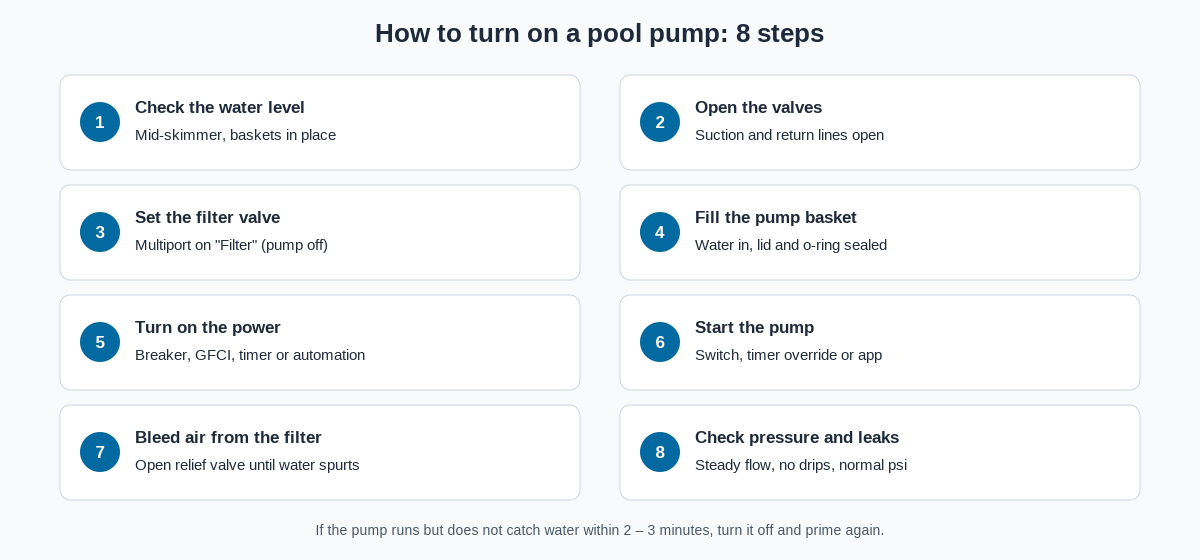
Diagram: Asphapro.com
Quick Answer
To turn on a pool pump, first make sure the water level is at the middle of the skimmer and the skimmer and pump baskets are in place. Open the suction and return valves, and with the pump off, set the filter's multiport valve to "Filter." Fill the pump basket with water, close the lid tightly, then switch on the breaker and start the pump with its switch, timer or control panel. Open the filter's air relief valve until water spurts, then close it. Check for steady flow, normal pressure and leaks. If the pool pump is not turning on, check the breaker, GFCI, timer settings and for a humming motor before calling a pro.
Starting a pool pump sounds simple, and most days it is: the timer turns it on. But after opening the pool, cleaning the filter, a power outage or a repair, you may need to start it by hand. Doing it in the right order prevents running the pump dry, which can burn out the seal in minutes, and avoids damaging the filter by changing valve settings while the pump runs.
This guide explains how to turn on pool pump systems safely, how to use different controls, and what to check when the pool pump is not turning on. For priming in detail, see how to prime a pool pump.
How to Turn On Pool Pump Safely: Before You Start
Pool pumps run on 120 or 240 volts near water. Never open the motor's wiring cover with the power on. Make sure the pump is plugged into or wired to a GFCI-protected circuit. Stand on dry ground when switching power. If the equipment pad is flooded, do not touch any electrical equipment until an electrician checks it. Keep children away from the equipment pad, and keep the area around the pump dry, clear of leaves and free of stored chemicals.
How to Turn On Pool Pump: Step by Step
Step 1: Check the Water Level
The water should be at the middle of the skimmer opening. If it is too low, the pump will suck air and lose prime. Top up with a hose if needed, and wait for the level to rise before starting. Make sure the skimmer basket and weir door are in place, the skimmer is not blocked by leaves, and the main drain cover is secure.
Step 2: Open the Valves
Make sure the valves on the suction side (from the skimmer and main drain) and the return side (back to the pool) are open. A closed suction valve starves the pump; a closed return valve can build dangerous pressure. If you have a three-way valve, set it to draw from the skimmer and drain as you normally do for daily filtering.
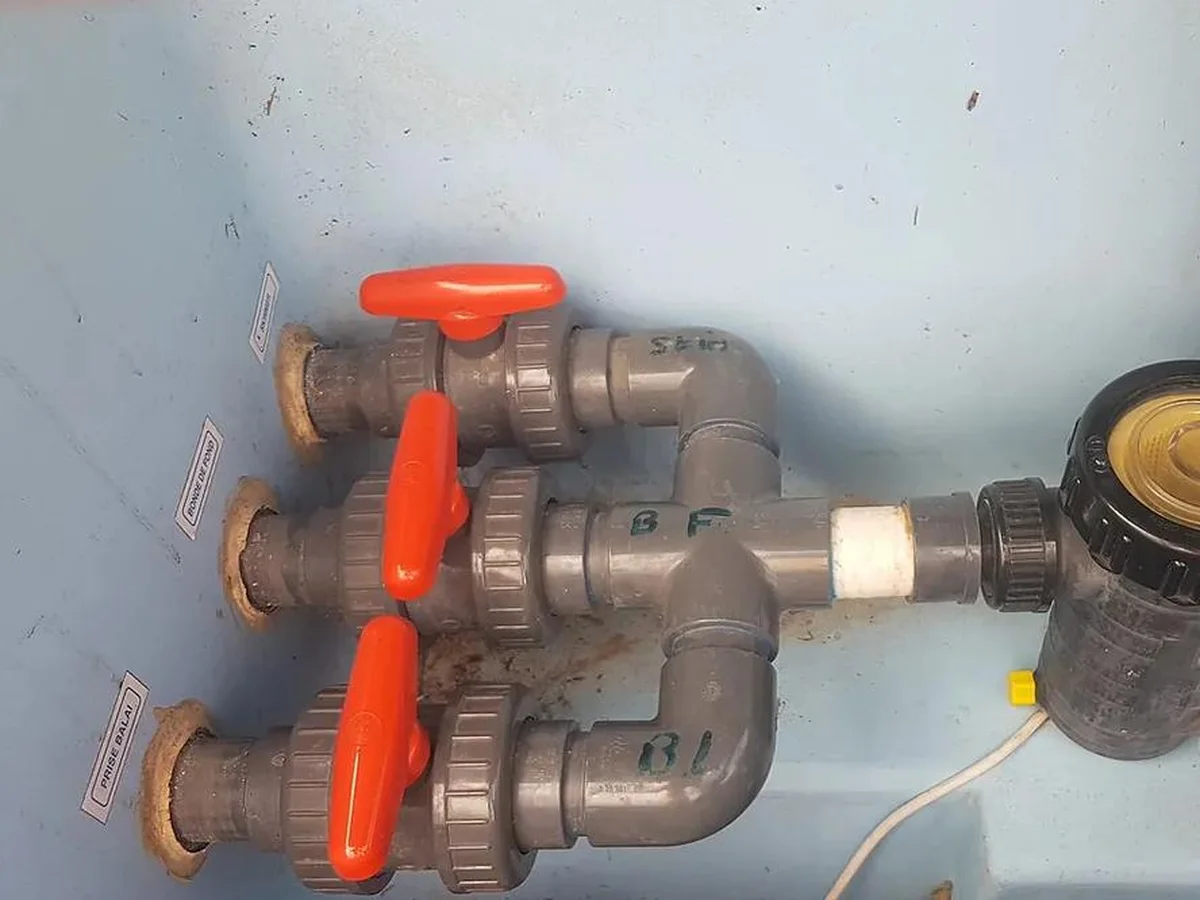
Photo: Enrevseluj, Wikimedia Commons, CC BY-SA 4.0
Step 3: Set the Filter Valve
With the pump off, set the multiport valve on a sand or DE filter to "Filter." Never turn the multiport handle while the pump is running; it can damage the spider gasket inside. Cartridge filters usually have no multiport valve, so you can skip this step for them.
Step 4: Fill the Pump Basket and Close the Lid
Open the pump lid, check the basket is clean and seated, and fill the pump housing with water from a hose or bucket. Check the lid o-ring for cracks, debris and flat spots, and lightly lubricate it with a silicone-based pool lubricant. Close the lid tightly so it seals with no air leaks.
Step 5: Turn On the Power
Switch on the breaker for the pump at the panel or sub-panel. If the pump is plugged into a GFCI outlet, press reset. If the pump is on a timer, make sure the timer is on or in override.
Step 6: Start the Pump
Start the pump using its switch, the timer's manual override, or the control panel or app for automation and variable-speed pumps. Variable-speed pumps may start with a priming cycle at high speed for a few minutes before dropping to the set speed.
Step 7: Bleed Air From the Filter
Open the air relief valve on top of the filter until a steady stream of water comes out, then close it. This removes trapped air that reduces filtering, can make the pressure gauge jump and, in rare cases, can make the filter lid unsafe to open.
Step 8: Check Pressure, Flow and Leaks
Watch the pump basket fill with water within a minute or two. Check that water is flowing from the return jets and that the filter pressure is in its normal range. Look for drips at unions, the pump lid, the drain plugs and the filter. If the pump runs but does not catch water within two to three minutes, turn it off and prime again.
Pool Pump Not Turning On: Troubleshooting
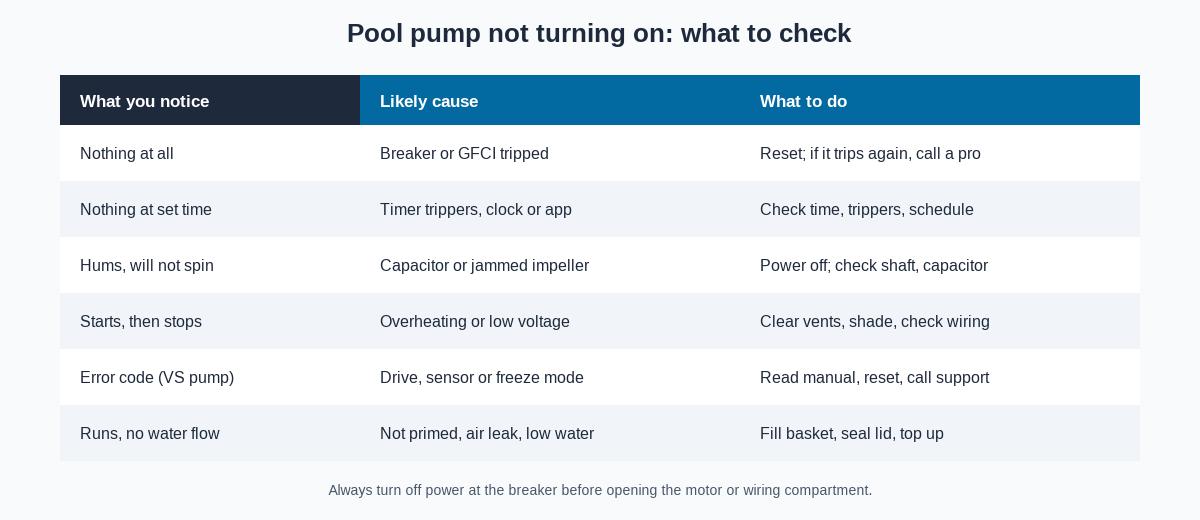
Chart: Asphapro.com
If your pool pump is not turning on, work through these checks in order.
No power at all. Check the breaker; it may have tripped. Check any GFCI outlet or breaker and press reset. If the GFCI or breaker trips again right away, there may be a ground fault in the motor or wiring; turn it off and call an electrician or pool technician.
Timer or automation settings. Mechanical timers can have the clock set wrong after a power outage or trippers out of place. Digital timers and apps may have the schedule off. Check the time, the on and off settings, and whether a holiday or vacation mode is turned on.
Motor hums but does not spin. With power off, check that the shaft turns by hand (on many motors, through the back end cap). If it is stuck, the impeller may be jammed with debris or the bearings may be seized. If it spins freely, the start capacitor may have failed.
Pump starts and stops. The motor may be overheating from blocked vents, sun, low voltage or worn bearings. Let it cool for at least 30 minutes, clear the vents, add shade and have the wiring checked.
Variable-speed error codes. Look up the code in the manual. Some codes mean freeze protection, priming failure, low voltage or a drive problem that needs a technician.
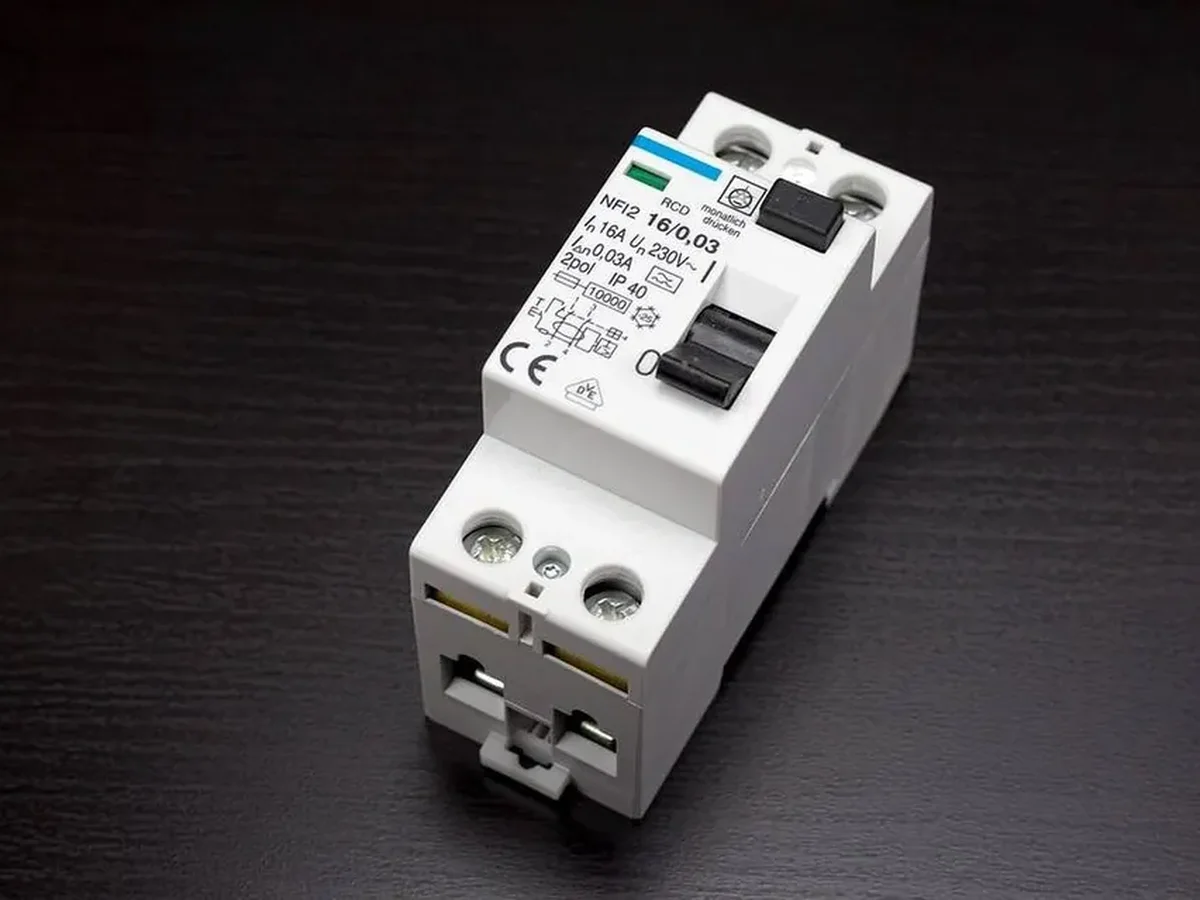
Photo: Diermaier, Wikimedia Commons, CC0
How to Turn a Pool Pump On With a Mechanical Timer
Many pools use a mechanical dial timer in a gray metal box near the equipment. To turn a pool pump on manually, open the timer box and find the on/off lever, usually on the side of the dial. Flip it to "on" to start the pump right away. To set the schedule, rotate the dial so the current time lines up with the pointer, then set the "on" and "off" trippers around the dial at the times you want. After a power outage, the dial stops turning, so reset the time once power returns. If the pump does not start at its scheduled time, check that the trippers are tight and in the right places. Knowing how to turn a pool pump on at the timer is the quickest fix when the schedule is off.
How to Turn Pool Pump On With a Digital Timer or Automation
Digital timers and pool automation systems let you start the pump from a panel, remote or phone app. To turn pool pump on with automation, look for a "Filter" or "Pool" button, or a manual mode that overrides the schedule. Some systems require you to choose a speed for a variable-speed pump. If the pump will not start, check the system's display for messages such as "service mode," "freeze protection" or a heater cool-down, which can block or delay the pump. After a power outage, many digital systems keep their schedules but may need the time reset. Learning how to turn pool pump on from the automation panel saves trips to the equipment pad.
How to Turn On a Variable-Speed Pool Pump
Variable-speed pumps have their own control panel on the motor and may also connect to automation. Press the start or run button, then choose a preset speed or enter an RPM. Many variable-speed pumps run a priming cycle at high speed for a few minutes when they first start, then drop to the set speed. If the pump shows a "stop" light, press start; if it shows an error, check the manual. Some pumps have a timer of their own that can conflict with an external timer; set one or the other to control the schedule. Make sure the pump is not in "service" or "disabled" mode. Variable-speed pumps also have a freeze protection setting that can start the pump automatically in cold weather.
How to Turn On Pool Pump After Opening the Pool
After winter, the pump and plumbing may be empty and the drain plugs out. Reinstall the drain plugs in the pump and filter, reconnect any unions you removed, check o-rings and add lubricant. Raise the water to mid-skimmer, open the valves, set the filter valve to "Filter" and fill the pump basket with water. Turn on the breaker and start the pump. It may take a few minutes to catch prime as air leaves the lines. Bleed air from the filter. Expect some antifreeze and debris to flow through at first; empty the pump basket afterward. See how to open a pool after winter.
How to Turn a Pool Pump On After a Power Outage
After a power outage, many pumps restart on their own when power returns, but some do not. Check the breaker and any GFCI outlets, since power surges can trip them. Reset mechanical timers to the correct time. Check that variable-speed pumps and automation have not switched to a default or "off" mode. If the outage lasted a long time and the water level dropped or the pump lost prime, refill the pump basket before starting. If a lightning storm caused the outage and the pump will not run, the control board or motor may have been damaged by a surge; call a technician.
How to Turn On Pool Pump After Cleaning the Filter
After cleaning a cartridge filter or backwashing a sand or DE filter, turn the pump back on carefully. Make sure the filter lid or clamp band is tight and the drain plug is in. For sand and DE filters, set the multiport valve back to "Filter" with the pump off. Open the air relief valve, start the pump, and close the relief valve when water spurts out. Check the pressure gauge; it should read close to the clean pressure. For DE filters, add fresh DE through the skimmer right after starting. See how to clean swimming pool filter parts.
How to Turn On an Above Ground Pool Pump
Most above ground pool pumps plug into a GFCI outlet and have a simple on/off switch on the motor or cord. Check the water level and hoses, make sure the skimmer and return are open and the hose clamps tight, fill the pump basket if it has one, plug in the pump and switch it on. If the pump sits above the water level, it may need priming each time. If it will not start, press reset on the GFCI outlet and check that the outlet works with another device.
How to Turn Pool Pump On With a Heater or Salt System
Heaters and salt cells need water flowing before they turn on. Start the pump first and make sure flow is steady before turning on the heater or salt system. Many automation systems handle this automatically. When turning the pump off, let a gas heater cool down for a few minutes first if your system has a cool-down setting; turning off the pump while a heater is hot can damage it.
Pool Pump Not Turning On: Testing the Capacitor
On single-speed motors, a failed start capacitor is a common reason a pool pump is not turning on but hums. With the power off at the breaker, remove the motor's end cover. Capacitors store a charge, so discharge it safely with an insulated screwdriver across the terminals before touching. A capacitor that is bulging, leaking or burned is bad. A multimeter with a capacitance setting can confirm it. Replace it with one of the same microfarad and voltage rating. If you are not comfortable working with electrical parts, call a technician.
Pool Pump Not Turning On: Checking for a Jammed Impeller
Debris such as leaves, small stones, hair pins or pieces of broken toys can jam the impeller. With the power off, remove the pump basket and look into the impeller eye with a flashlight. Use a bent wire or long pliers to pull out debris. On some pumps, you can turn the motor shaft by hand from the back to check whether it spins freely. If it is stiff, the bearings may be worn or the impeller may be blocked. A clean skimmer basket and pump basket prevent most jams.
Pool Pump Not Turning On: Overheating
Motors have thermal protection that shuts them off when they get too hot. If the pump starts and then stops after a while, feel the motor housing after it has been off for a few minutes. Overheating causes include blocked vents, direct sun, a covered or enclosed pad without airflow, low voltage from wiring that is too small, and worn bearings. Clear the vents, add shade and airflow, and have an electrician check the voltage at the motor while it runs.
Pool Pump Not Turning On: When to Call a Professional
Call a pool technician or electrician if the breaker or GFCI trips repeatedly, you smell burning, you see scorched wires, the motor hums loudly and gets hot without spinning, or a variable-speed pump shows drive errors that do not clear. These problems can involve dangerous voltages and expensive parts. A pro can test the motor windings, capacitor, drive and wiring safely and tell you whether repair or replacement is best. See how long do pool pumps last.
How to Turn Off a Pool Pump Safely
To turn off the pump, use its switch, timer or control panel. If you will be working on the pump or filter, also switch off the breaker so no one can turn it on by accident, and close the valves if the pump sits below the pool water level. Release pressure from the filter using the air relief valve before opening it. Turning the pump off in the right way protects both you and the equipment.
Pool Pump Not Turning On After Rain or Flooding
If the pool pump is not turning on after heavy rain, water may have reached the motor, wiring or timer box, tripping the GFCI. Do not keep resetting it. Turn off the breaker, let everything dry, and check for standing water around the pad. Raise the pump on a pad if it sits in a low spot, and make sure the timer box and wiring connections are sealed. If the GFCI still trips once everything is dry, the motor windings may be damaged by moisture; have an electrician test it. Protecting the equipment pad from flooding is one of the best ways to avoid a pool pump not turning on after storms.
Pool Pump Not Turning On in Cold Weather
In cold weather, some pumps will not start because of freeze protection settings, a frozen impeller or ice in the pump housing. Never force a frozen pump to run; it can crack the housing or damage the seal. Let it thaw naturally or warm the area gently, then check for cracks before starting. If your automation has freeze protection, check that the air sensor is working; a failed sensor can keep the pump off or running all the time. For pools that stay open in winter, freeze protection is important to keep water moving during cold nights.
How to Turn On Pool Pump for the First Time After Installation
A new pump needs a careful first start. Check that the wiring matches the voltage setting on the motor (many motors can be set for 115 or 230 volts), that the pump is bonded to the pool's bonding wire, and that all unions and fittings are tight. Fill the pump with water, open the valves, set the filter valve to "Filter," and start the pump. Watch for leaks and listen for unusual noises. Check that the motor turns in the right direction if the maker gives a direction arrow. For variable-speed pumps, set the clock, speeds and schedule. Learning how to turn on pool pump equipment properly the first time helps it last longer.
Common Mistakes When Turning On a Pool Pump
The most common mistake is starting the pump with no water in the basket, which can burn the seal within minutes. Others include turning the multiport valve while the pump is running, forgetting to open a suction or return valve, starting with the water level below the skimmer, leaving the drain plugs out after winter, and forgetting to bleed air from the filter. Repeatedly resetting a GFCI that keeps tripping is also dangerous. Following the steps in order prevents these problems and keeps the pump running smoothly.
How to Turn On Pool Pump Less Often: A Daily Routine
Once everything is set, most pumps run on a timer or automation schedule, so you rarely need to turn them on by hand. A quick daily look at the equipment pad helps catch problems early: check that the pump is running at its scheduled time, the basket is not full, the pressure is normal and nothing is leaking. Once a week, empty the baskets and check the timer clock. These small habits mean fewer days of finding the pool pump not turning on.
Quick Reference: How to Turn On Pool Pump Equipment
Here is a short reference for how to turn on pool pump systems of each type. For a pump on a mechanical timer, how to turn pool pump on is as simple as flipping the timer's manual lever after checking water, valves and the basket. For a variable-speed pump, press start on the motor's keypad and choose a speed. For automation, use the app or panel's manual mode. For an above ground pump, plug it into a working GFCI outlet and flip its switch. In every case, how to turn a pool pump on safely comes down to the same rules: water in the basket, valves open, filter set with the pump off, then power on and bleed the air. If the pool pump is not turning on after these steps, use the troubleshooting chart above before calling for service.
How to Turn On Pool Pump: Key Points
- Check water level, baskets and valves before starting.
- Set the filter valve with the pump off and fill the pump basket.
- Turn on the breaker, start the pump and bleed air from the filter.
- If it will not start, check the breaker, GFCI, timer and for humming.
Frequently Asked Questions
Why is my pool pump not turning on?
When a pool pump is not turning on, the usual causes are a tripped breaker or GFCI, wrong timer or automation settings, a failed capacitor, a jammed impeller or an overheated motor. Check the simple things first: power, timer and baskets.
How do I turn on my pool pump manually?
To turn pool pump on manually, flip the on/off lever on a mechanical timer, press the start button on a variable-speed pump, or use the manual or override mode on your automation panel or app. Make sure the valves are open and the basket is full of water first.
Do I need to prime the pump every time?
Only if it has lost water, such as after cleaning the basket, opening the pool, a leak or a long power outage. A pump set below the water level usually stays primed on its own.
Can I run the pool pump without water?
No. Running dry can damage the shaft seal within minutes and can overheat and warp plastic parts. Always make sure the pump basket is full of water before you turn a pool pump on.
Why does my pool pump hum but not run?
Often a bad start capacitor, a jammed impeller or seized bearings. Turn off the power right away to avoid burning out the motor, then check the shaft and capacitor or call a technician.
Should the filter valve be moved with the pump on?
No. Always turn off the pump before moving the multiport handle, or you can damage the spider gasket and send dirt back into the pool.
Sources
- OSHA: Electrical safety
- CPSC: Pool and spa safety
- US Department of Energy: Swimming pool pumps
- NFPA 70: National Electrical Code